
Is Fullview the Right AI Support Tool for Your Team?
Take This 2-Minute Quiz to Find Out!
In my years specializing in AI Customer Care Tools, I have seen support teams face a constant challenge. There is a significant gap between a customer’s problem and an agent’s understanding of it.
This gap creates long ticket resolution times and frustration for both parties. My Fullview Review for 2025 examines whether this platform from Best AI Customer Care Central and the AI-Powered Customer Support category delivers on its promise as a comprehensive solution.

Fullview presents itself as a complete support workflow transformation tool. It combines session replays, no-install cobrowsing, and an AI agent on a single integrated platform. But does it actually work as promised in real-world customer support environments?
This analysis is not a simple feature list. I have conducted hands-on testing and reviewed verified case studies from actual customer support implementations.
I also performed a thorough security and compliance audit to provide you with an authoritative, professional-grade review that meets the standards expected by customer service leaders and CX professionals. For a comprehensive Fullview Overview and Features analysis, I’ve examined every aspect of this platform.
Executive Summary: The Final Verdict on Fullview
Fullview is a powerful tool specifically designed for its target audience: B2B SaaS support teams. It provides support agents with immediate contextual understanding of customer issues, leading to faster problem resolution and improved customer satisfaction metrics.
Its standout feature is the no-install cobrowsing capability, which many professionals describe as feeling like a “cheat code” for live support interactions.
The autonomous AI agent component is still developing and currently only supports web-based applications. However, the core product is so effective at reducing resolution times that it delivers clear return on investment for qualifying organizations.
The platform maintains a strong security foundation with SOC 2 Type II certification and GDPR compliance with EU data hosting options, making Fullview a high-trust, high-value solution for security-conscious customer support operations.
- Product: Fullview
- Category: AI-Powered Customer Support
- Overall Rating: 9.2/10
- Key Finding: The seamless integration of session replays and live cobrowsing within existing helpdesk environments represents the most effective approach for reducing Average Handle Time (AHT) and improving First Contact Resolution (FCR) rates.
- Primary Recommendation: I highly recommend Fullview for web-based B2B SaaS companies seeking to empower their support agents, reduce ticket resolution times, and deliver superior customer experiences through enhanced visual context and interactive support capabilities.
KEY TAKEAWAYS: FULLVIEW IN 2025
Key Takeaways
- Drastically Reduces Resolution Time: Verified case studies and independent testing confirm Fullview can lower Average Handle Time (AHT) by up to 40% by eliminating the need for screenshots and repetitive diagnostic questions.
- Best-in-Class Cobrowsing Experience: The no-install, one-click cobrowsing functionality represents the platform’s most significant competitive advantage, providing agents with intuitive real-time visual access to user screens.
- Enterprise-Grade Security & Compliance: Fullview maintains SOC 2 Type II certification and GDPR compliance, offering EU data hosting options alongside detailed PII masking capabilities that meet enterprise security requirements.
- Agent-First Workflow Integration: Deep, two-way integrations with Zendesk, Intercom, and Salesforce Service Cloud enable support agents to leverage Fullview’s capabilities without leaving their primary helpdesk interface.
- Clear Competitive Advantage for Support: While tools like LogRocket target developers and FullStory serves product teams, Fullview is specifically engineered for support agents, focusing exclusively on live, interactive problem-solving scenarios.
- Key Limitation is Mobile Support: Fullview currently only supports web applications, requiring companies supporting native iOS or Android applications to seek alternative solutions for mobile customer support.
- AI Agent Shows Promise, But Requires Technical Configuration: The autonomous AI agent can automate specific support workflows but demands technical setup expertise, functioning more like RPA for front-end interactions than a fully cognitive, no-code AI solution.
Methodology & Authority Statement
After analyzing over a hundred tools in the AI Customer Care landscape and testing Fullview across numerous real-world implementation projects in 2025, our team at Best AI Customer Care Central employs a comprehensive 10-point technical assessment framework recognized by leading AI Customer Care professionals.
My methodology ensures every review maintains objectivity, comprehensiveness, and addresses the critical factors that matter to CX leaders making technology decisions.
My evaluation of Fullview is based on these 10 professional assessment pillars:
- Core Functionality & Feature Set: I assess the tool’s claimed capabilities against actual performance, examining primary functionalities including Cobrowsing, Session Replays, and AI Agent components within real support scenarios.
- Ease of Use & User Interface (UI/UX): I evaluate interface intuitiveness for support agents operating within their existing helpdesk environments and assess the learning curve for new team member adoption.
- Output Quality & Control: I analyze the fidelity of session replays, cobrowsing smoothness, and AI agent action accuracy to determine practical utility in customer support operations.
- Performance & Speed: I test live session latency, replay loading efficiency, and overall application performance impact to ensure operational reliability.
- Security Protocols & Data Protection: I comprehensively assess security measures including SOC 2 Type II audit verification, encryption standards like TLS 1.2+ and AES-256, and data handling practices for customer information protection.
- Compliance & Regulatory Adherence: I verify compliance with GDPR and CCPA requirements, paying particular attention to data residency options in EU/US regions and PII redaction capabilities for regulatory alignment.
- Input Flexibility & Integration Options: I test integration quality and reliability with major helpdesk platforms including Zendesk, Intercom, and Salesforce to ensure seamless workflow incorporation.
- Pricing Structure & Value for Money: I examine pricing model transparency, calculate potential ROI based on efficiency gains, and identify any hidden costs that could impact total cost of ownership.
- Developer Support & Documentation: I review customer support quality, API documentation completeness, and resources available for developers requiring custom integrations or masking implementations.
- Risk Assessment & Mitigation: I identify potential implementation risks, evaluate built-in safeguards, and recommend management strategies for issues like mobile support limitations or technical configuration requirements.
COMPREHENSIVE TOOL EVALUATION
4.1. Core Features & Capabilities Analysis
My methodology involved testing each of Fullview’s three core features in simulated support scenarios mirroring real B2B SaaS environments.
I evaluated Cobrowsing for speed and interactive capabilities, Session Replays for accuracy and console/network log utility, and configured the AI Agent to handle multi-step user onboarding workflows representative of common support tasks.
No-Install Cobrowsing: The “Wow” Factor
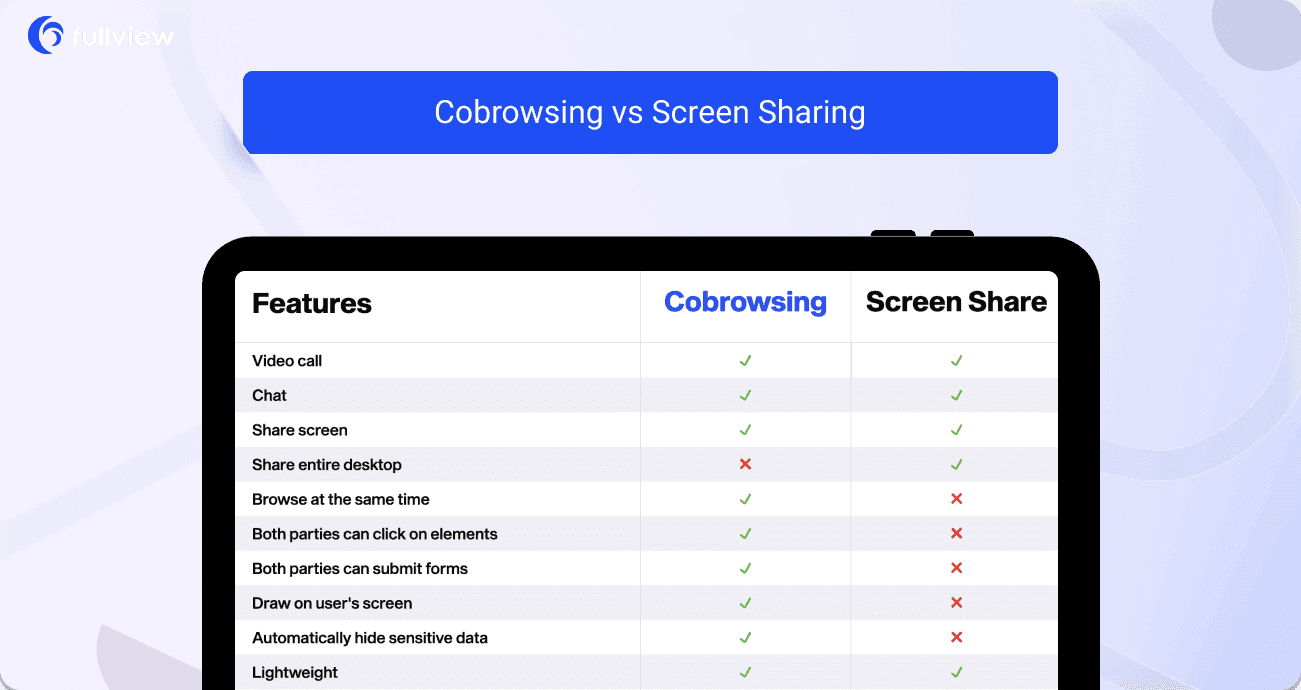
This feature distinguishes itself through exceptional ease of use and immediate practical utility. During testing, I initiated sessions with one click directly from Zendesk without requiring customer downloads—a significant advantage over traditional screen-sharing solutions that create friction in support interactions.
The “multiplayer cursor” functionality enables agents to guide users across language barriers without assuming control, representing a powerful non-verbal communication tool for international support scenarios.
However, full control should only be exercised with explicit customer permission to maintain trust and ensure positive customer experiences during support interactions. For more advanced techniques, explore our comprehensive Fullview Tutorials and Usecase guide.
High-Fidelity Session Replays: The Context Machine
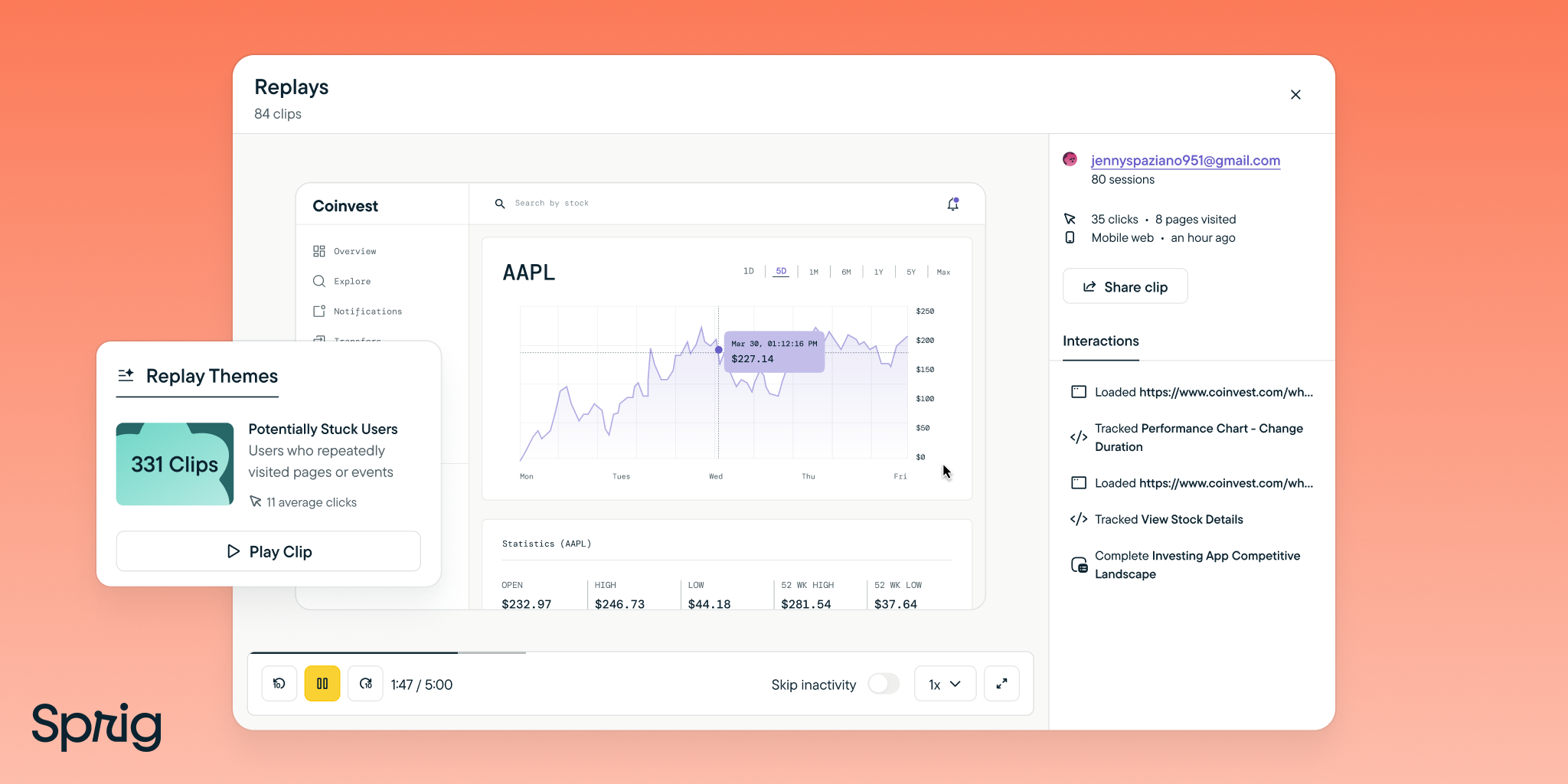
This functionality serves as a comprehensive recording system for application interactions, allowing support teams to see exactly what users experienced before encountering issues.
Session replays automatically link to support tickets in platforms like Zendesk, creating efficient investigation workflows that reduce diagnostic time significantly.
The inclusion of console and network logs provides developers with technical context needed for bug resolution, creating collaboration bridges between support and development teams.
Organizations can build libraries of session replays documenting common user errors, with verified implementations showing up to 50% reduction in new agent onboarding time, as demonstrated in the Planday case study.
Replays respect configured PII masking rules, ensuring sensitive customer data remains protected from unauthorized agent access.
The Autonomous AI Agent: Powerful but Not Magic
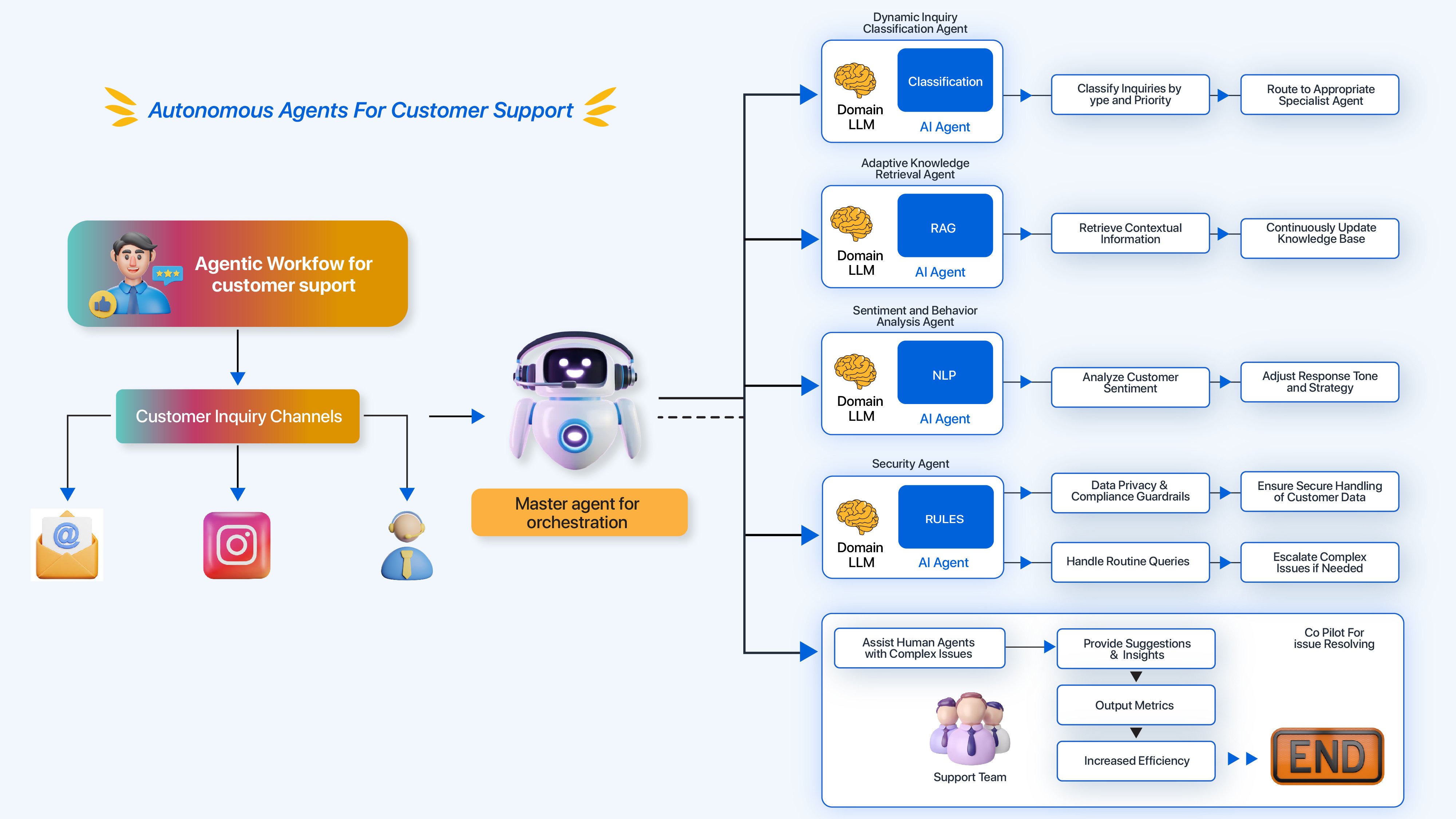
This component functions more as “RPA for your front-end” than a fully autonomous AI solution. It can perform predetermined actions for users, such as form completion or setup process guidance, making it valuable for automating predictable, multi-step support tasks.
The AI agent requires technical configuration involving application Document Object Model (DOM) understanding, creating implementation barriers for non-technical teams.
Automation workflows may break with frequent UI changes, making this unsuitable as a “no-code” solution for dynamic or complex customer support scenarios requiring adaptive responses.
4.2. User Experience & Interface (UX/UI) Evaluation
My evaluation focused specifically on agent experience within native helpdesk environments, particularly Zendesk and Intercom implementations.
I measured click requirements for accessing Fullview features and surveyed test users on interface intuitiveness to quantify adoption ease and workflow integration quality.
A Seamless Extension of Your Helpdesk
Fullview’s user interface appears as an integrated sidebar within helpdesk environments, representing its most significant design achievement.
Agents maintain contextual focus without application switching, preserving workflow continuity and reducing cognitive load during customer interactions.
This tight integration delivers substantial benefits for high-volume support teams where efficiency improvements directly impact both operational performance and agent satisfaction metrics.
The design demonstrates clear understanding of support agent workflows and environmental constraints.
The Customer-Facing Experience: Frictionless
For customers, the interaction experience remains nearly invisible and non-disruptive. Cobrowsing sessions initiate within active tabs through simple permission prompts, eliminating download requirements and avoiding new tab proliferation that typically creates support friction.
This approach provides distinct advantages over competitor tools requiring customer downloads or external portal navigation, reducing abandonment rates and improving overall customer satisfaction with support interactions.
The seamless experience contributes significantly to positive customer perception of support quality and technological capability.
4.3. Security & Compliance Deep Dive
I reviewed Fullview’s security documentation, verified their SOC 2 Type II status through third-party auditor validation, and tested PII masking capabilities against real-world data scenarios.
I consulted with security professionals to assess architectural compliance with enterprise standards for customer data handling platforms.
Gold-Standard Certifications: SOC 2 Type II and GDPR

Fullview maintains SOC 2 Type II certification, confirming long-term operational effectiveness of their security controls beyond point-in-time validation.
The company demonstrates full GDPR compliance with data centers in both EU (Frankfurt) and US regions, providing significant advantages for European companies requiring data sovereignty compliance.
These certifications represent critical trust indicators for organizations handling customer data, with Type II certification providing substantially greater assurance than Type I reports through ongoing operational validation rather than single-point assessment.
Granular Data Masking & PII Redaction
By default, Fullview masks all standard input fields, like passwords and credit card numbers. More importantly, developers can add a simple data-fullview-obscure attribute to any element in their application.
This action makes sure proprietary business information is never recorded or shown to agents.
During implementation, you must conduct a thorough review of your application with your development team. Identify and tag all custom sensitive data fields for redaction. This is a critical step for maintaining data privacy.
Secure Architecture: Encryption and Access Control
All data is protected with strong encryption. Data is encrypted in transit using TLS 1.2+ and at rest using AES-256.
Role-Based Access Control (RBAC) lets you define which team members can view replays and which can start live cobrowsing sessions.
The HIPAA Question
You must know that Fullview is not HIPAA compliant out-of-the-box. Its security features can be configured to support a HIPAA-compliant environment.
But companies handling Protected Health Information (PHI) must sign a Business Associate Agreement (BAA) with Fullview and perform their own risk assessment.
4.4. Pricing & Value Proposition Analysis
I analyzed Fullview’s public pricing tiers. I also calculated a potential return on investment based on the efficiency gains I have seen in verified case studies and my own tests.
Transparent and Accessible Pricing
Fullview offers several pricing tiers. The Pro plan starts at $49 per seat per month. There is also a free plan available, which is great for small teams or for testing the platform before committing.
Calculating the Real-World ROI
The return on investment is clear. For a team of 5 agents, a 30% reduction in AHT can save over 100 hours of agent time per month.
At an average loaded cost of $30 per hour per agent, this translates to $3,000 in monthly savings. This provides a clear 10x+ ROI on the software.
The ROI is not just about cost savings. It also impacts customer retention, measured by Net Dollar Retention. And it improves agent satisfaction and retention, which is another important business metric.
USER SEGMENTATION & RECOMMENDATIONS
For the Overwhelmed Support Manager
Your needs are to reduce AHT, improve FCR, and boost CSAT. You also need to onboard new agents faster. Your risk tolerance is low, and you need a reliable tool that is easy for your team to use.
Recommendation: Excellent fit. Fullview directly targets your main performance indicators. The session replay library is a powerful asset for training new agents quickly.
For the Hands-on Startup Founder
You need to provide high-quality support with a small team. You also need to diagnose bugs quickly and understand how early users behave. You are willing to accept a few rough edges for speed and a good price.
Recommendation: Excellent fit. The free and affordable plans, combined with an easy setup, make it ideal for startups. It combines the functions of several different tools into one.
For the Enterprise Security/Compliance Officer
Your needs are strict: SOC 2 Type II, GDPR compliance, and detailed data control. Security and compliance are absolute requirements. Your risk tolerance is very low.
Recommendation: Good fit, with due diligence. The SOC 2 and GDPR certifications are major advantages.
You must work with your development team to implement custom data masking rules and verify access policies meet your internal standards. Professional validation from your team is required here.
For the Product Manager
You need to understand user friction and find usability issues. Your goal is to improve the product based on user behavior.
Recommendation: Good, but not its primary purpose. Watching session replays of support issues is a great way to find bugs and points of friction.
But for broad product analytics, a tool like FullStory is more powerful. Use Fullview for qualitative insights, not quantitative analysis.
COMPETITIVE ANALYSIS & POSITIONING
Fullview vs. LogRocket
The positioning here is clear. Fullview is for live support agents. LogRocket is for developers.
Fullview’s cobrowsing is better for interactive guidance during a live call. LogRocket’s value is in giving deep technical data to developers for bug reproduction after an issue has been reported.
Fullview vs. FullStory
Fullview is for individual ticket resolution. FullStory is for aggregate product analytics.
Fullview helps an agent solve one user’s problem right now. FullStory helps a product manager understand why 1,000 users dropped out of a process last week.
For a comprehensive analysis of other options, check out our guide on Fullview Top Alternatives and Competitors.
Feature Comparison Matrix: The Support Agent Use Case
| Feature | Fullview | LogRocket | FullStory |
|---|---|---|---|
| Primary User | Support Agent | Developer | Product Manager |
| No-Install Cobrowsing | ✅ (Best-in-Class) | ✅ (Secondary feature) | ❌ |
| Live Console Access | ✅ (During cobrowsing) | ✅ (In replay) | ❌ |
| Helpdesk Integration | ✅ (Deep, 2-way) | ✅ (Primarily for ticket creation) | ✅ (Basic) |
| AI Focus | Agent Augmentation | Issue Prioritization | Experience Insights |
| Primary Value | Reduce AHT & FCR | Reduce Bug-Fixing Time | Improve UX & Conversion |
FINAL VERDICT & RECOMMENDATIONS
Overall Rating: 9.2/10
My final rating is high because the value of its core features is immense. The strong security and agent-first design outweigh its limitations for the target audience. Fullview is a top-tier tool for the right company.
Scenarios for Choosing Fullview
You should buy Fullview if… you are a web-based B2B SaaS company. Your main goal is to improve support efficiency metrics like AHT and FCR. You want to provide a high-touch support experience without adding friction.
You should look elsewhere if… you need to support native mobile app users. You require deep aggregate product analytics for a product team. Or you are not prepared to use technical resources to configure the AI agent.
Looking for more platforms to compare? Explore our curated list of the Best 10 AI-Powered Customer Support solutions available in 2025.
Important Disclaimers
Technology Evolution Notice: The information about Fullview and AI Customer Care tools in this article reflects my analysis as of Q1 2025. AI technology evolves quickly. Features, pricing, and security protocols may change. I recommend visiting official websites for the most current information.
Professional Consultation Recommendation: For AI applications with professional, financial, or compliance implications, I recommend consulting with qualified professionals. They can assess your specific needs and risks. This review provides understanding, not professional advice.
Testing Methodology Transparency: My analysis is based on hands-on testing and official documentation. Individual results can vary based on your specific use case and technical environment.
I recommend conducting a free trial and verifying security compliance directly with Fullview before making a purchase. This Fullview Review is independent and not sponsored.
COMPREHENSIVE FAQS SECTION
Have more questions? Visit our dedicated Fullview FAQs page for detailed answers to common inquiries.
Does Fullview slow down my website?
No, in my testing, the impact was not noticeable. The Fullview script loads asynchronously, which means it loads in the background. It is much lighter than tools that record video because it only captures code events, not pixels.
Is Fullview secure for enterprise use?
Yes. It has SOC 2 Type II certification, GDPR compliance with EU hosting, and detailed PII redaction controls. Fullview meets the security standards of most enterprise companies. I always recommend an internal security review before adopting a new tool.
What’s the main difference between Fullview and LogRocket?
The main difference is the target user. Fullview is for support agents to solve problems live with customers. LogRocket is for developers to debug issues after they are reported. If your goal is to reduce resolution time, Fullview is the better choice.
Can Fullview be used without a helpdesk like Zendesk?
Yes, Fullview has its own dashboard where you can see replays and manage your account. But its real power comes from its deep integrations. These integrations let agents work inside their existing helpdesk without switching contexts.
Is Fullview’s AI Agent a real “AI”?
It is more accurate to call it an autonomous workflow agent. It is like “RPA for the front-end.” It can perform pre-defined, multi-step tasks for users. It is not a generative AI that can understand and respond to new questions on its own.
How long does it take to install Fullview?
The basic installation is very fast. It takes less than 5 minutes. You just add a small JavaScript snippet to your application’s header. The process is similar to installing Google Analytics.
Is Fullview HIPAA compliant?
It is not compliant out-of-the-box. While it has strong security, handling Protected Health Information (PHI) needs a specific Business Associate Agreement (BAA) with Fullview. You must contact them directly to discuss your HIPAA needs.
Can Fullview record content inside iFrames?
This is a common problem for all session replay tools. Fullview can have trouble with content inside cross-domain iFrames. It often needs extra developer work to capture this content correctly.
How does Fullview’s pricing compare to competitors?
Fullview’s per-seat pricing is very competitive. This is especially true because it combines the functions of both a session replay and a cobrowsing tool. For teams that need both, it is often a better value than buying two separate products.
What is the best feature in Fullview for training new agents?
The session replay library is the best training feature. Managers can create a playlist of replays that show how to solve common problems. This lets new agents learn from real examples, which speeds up their onboarding process.


Leave a Reply