
Is Fullview the Right AI-Powered Customer Support Tool for You?
Take This Quick Quiz to Find Out!
Navigating the evolving landscape of AI-powered customer support can be complex, and finding the right tools is paramount for efficiency and customer satisfaction.
This comprehensive guide to Fullview FAQs cuts through the noise, providing clear answers to your most pressing questions about a platform transforming how we approach visual customer assistance.
As leaders in AI-Powered Customer Support, we at Best AI Customer Care Central are dedicated to helping professionals like you make informed decisions.
You’re likely exploring solutions to reduce average handle time (AHT) and boost first-contact resolution (FCR) while ensuring data security.
Here, we delve into Fullview’s core functionalities, from its innovative cobrowsing and session replay features to its robust data protection mechanisms, including SOC 2 compliance.
Our goal is to clarify how Fullview integrates with existing systems and delivers tangible ROI, helping you elevate your department from a reactive cost center to a strategic growth engine.
Let’s explore how this tool fits into your overall AI-Powered Customer Support strategy.
Key Takeaways
- Visual Context Revolution: Fullview transforms customer support from text-based troubleshooting to real-time visual assistance through cobrowsing and session replay technologies
- Measurable Efficiency Gains: Organizations achieve 30-50% reduction in average handle time and 25-40% increase in first-contact resolution rates
- Enterprise-Grade Security: SOC 2 Type II certified with GDPR and CCPA compliance, automatic data redaction, and multi-layered security framework
- Seamless Integration: Deep integrations with Zendesk, Intercom, and Salesforce enable agents to access visual context without switching applications
- Rapid Implementation & ROI: Less than 30 minutes technical setup with full ROI typically achieved within 3-6 months through combined efficiency gains
What is Fullview, and how does it fundamentally change customer support?
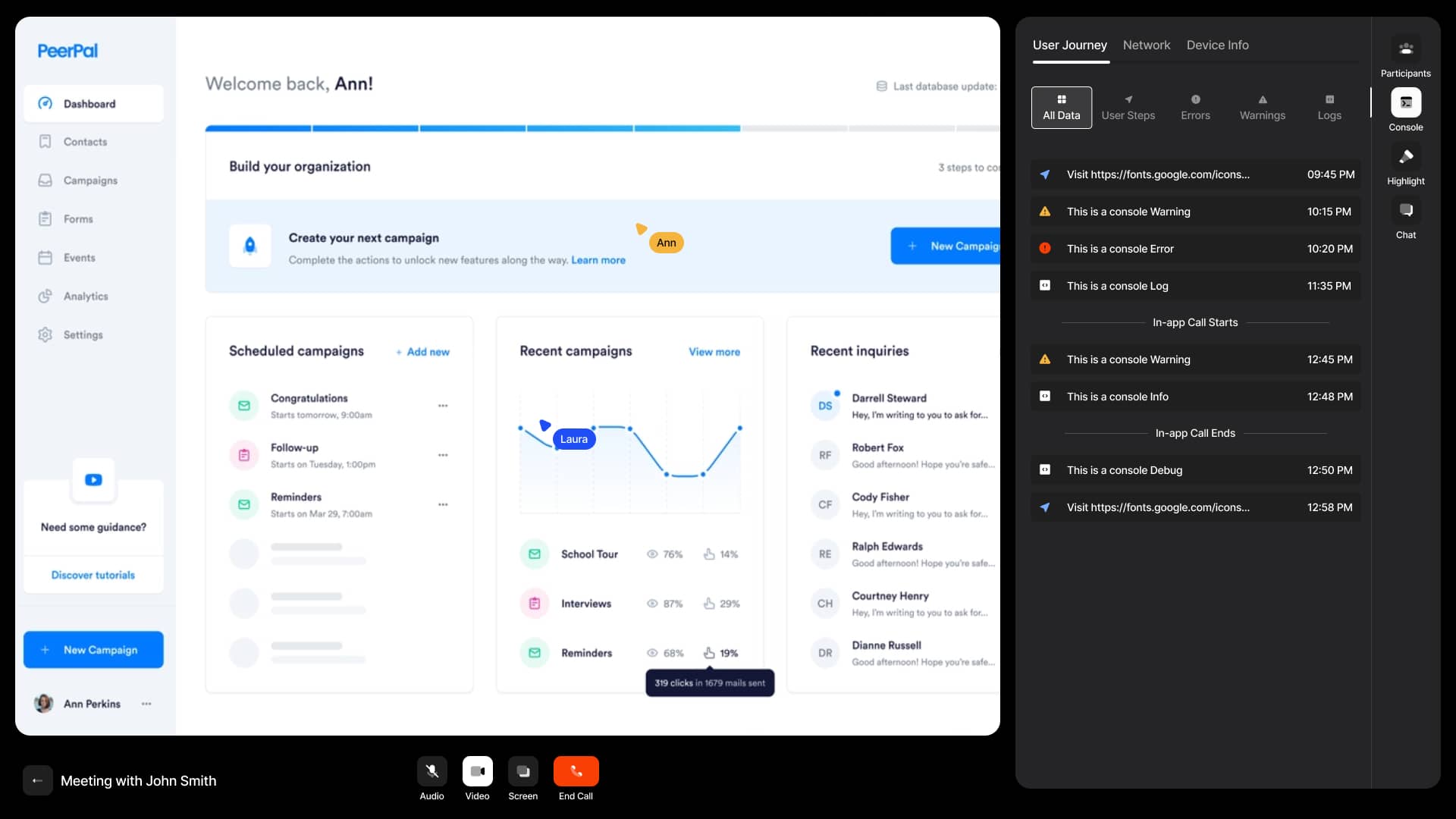
Fullview is an AI-powered customer support platform that transforms how modern customer service teams handle complex technical issues and user onboarding challenges.
Unlike traditional support tools that rely on back-and-forth communication, Fullview provides support agents with real-time visibility into the customer’s actual experience through two core technologies: interactive cobrowsing and historical session replays.
This eliminates the guesswork from troubleshooting by allowing agents to see exactly what the customer sees, as if they were sitting right beside them.
The platform integrates directly into existing helpdesk systems like Zendesk and Intercom, creating a seamless workflow where agents can access visual context without switching between applications.
For comprehensive information on Best 10 AI-Powered Customer Support solutions transforming the industry, explore how these platforms compare across different use cases and organizational needs.
For AI customer care tools, this represents a significant evolution from text-based support to visual, context-rich assistance.
By providing immediate, actionable context, Fullview reduces average handle time by 30-50%, improves first-contact resolution rates, and transforms customer support from a reactive cost center into a proactive, efficiency-driven operation that enhances both agent performance and customer satisfaction metrics.
What is Fullview Cobrowsing, and how is it different from traditional screen sharing?
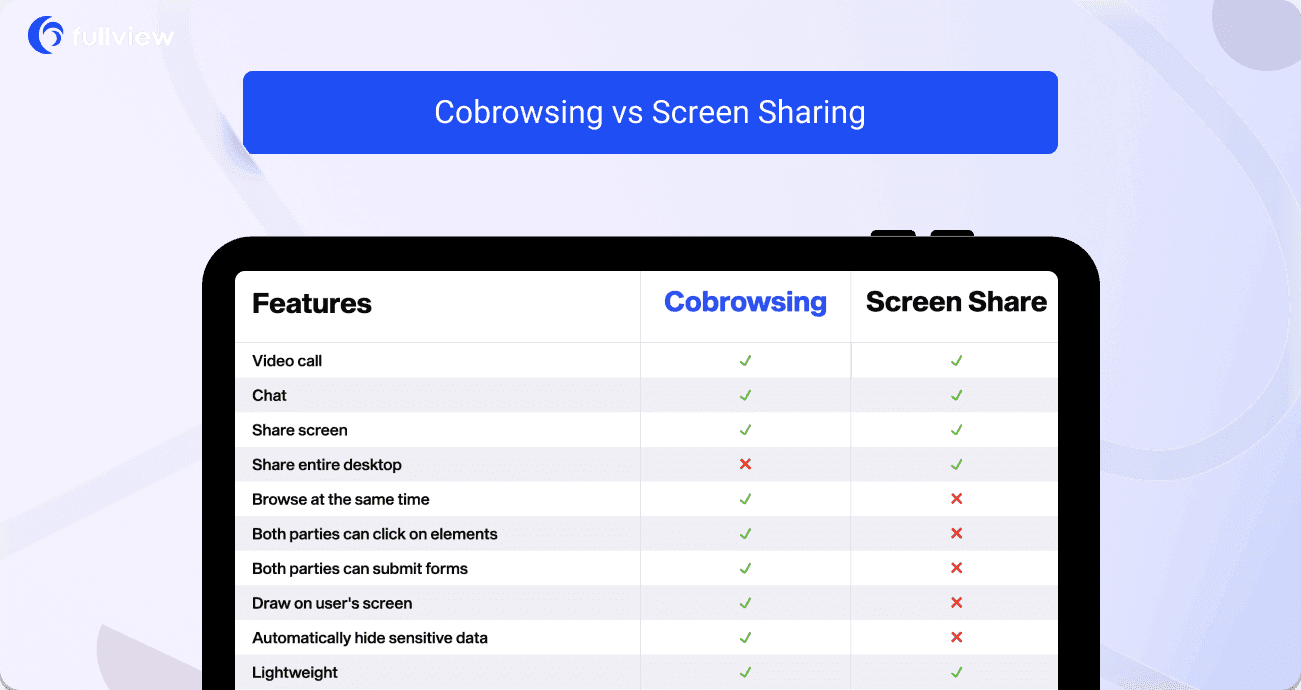
Fullview Cobrowsing represents a sophisticated approach to visual customer support that differs fundamentally from traditional screen sharing solutions.
Unlike conventional tools like Zoom or TeamViewer that require software downloads and show the entire desktop, cobrowsing operates securely within a specific browser tab without any installations.
This technology enables support agents to view and interact with the customer’s web application in real-time while maintaining strict privacy boundaries—agents cannot see other tabs, desktop applications, or personal notifications.
The key advantage for AI customer care tools is the seamless integration: cobrowsing initiates directly from your website or web application through a lightweight JavaScript snippet, eliminating the friction of asking customers to download and configure separate software.
During sessions, agents can use visual guidance tools like highlighted cursors and screen drawing to direct users, and with permission, can even take control to demonstrate complex workflows or troubleshoot issues directly.
This precision targeting, combined with automatic data redaction capabilities, makes Fullview Cobrowsing both more secure and more effective than traditional screen sharing for resolving technical support issues in web-based environments.
For an in-depth analysis of Fullview’s capabilities, check out our detailed Fullview Review comparing features, performance metrics, and real-world implementation results.
Who is the ideal user for Fullview in AI customer support?
Fullview is specifically designed for customer-facing teams in SaaS companies and web-based organizations that require efficient resolution of complex technical and user experience issues.
The primary users are customer support agents and technical support engineers who benefit from visual context to diagnose problems without relying on incomplete customer descriptions.
These professionals can reduce average handle time by 30-50% by seeing issues firsthand rather than asking for screenshots or step-by-step explanations.
Customer success managers also leverage Fullview to guide users through onboarding processes and feature adoption, creating more engaging and effective customer experiences.
Beyond direct support roles, product managers and UX designers utilize the session replay functionality to observe real user behavior, identify interface friction points, and gather actionable insights for product improvement.
Organizations that handle a significant volume of web-based support requests, particularly those involving complex workflows, technical configurations, or user education challenges, will find Fullview delivers substantial ROI through reduced resolution times, improved customer satisfaction scores, and valuable product intelligence gathered from user interactions.
How does Fullview protect sensitive customer data during Cobrowsing and Session Replays?

Fullview implements a comprehensive, multi-layered security framework designed specifically for the sensitive nature of customer support interactions in AI-powered care environments.
The platform utilizes automatic data redaction that occurs at the browser level before any information is transmitted to Fullview’s servers.
This means sensitive data like passwords, credit card numbers, and personally identifiable information (PII) is identified and masked locally, ensuring it never reaches external systems.
For additional protection, Fullview provides granular control through customizable redaction rules using a simple data-fullview-redact HTML attribute that can be applied to any element containing sensitive information.
The platform maintains SOC 2 Type II certification, demonstrating enterprise-grade security controls across data handling, access management, and system integrity.
All data is encrypted in transit and at rest, with EU-based hosting ensuring GDPR compliance for European customers.
For businesses subject to CCPA and other privacy regulations, Fullview provides the necessary tools for data subject access requests and deletion processes.
This security-first approach allows support teams to leverage visual context for troubleshooting while maintaining strict compliance with global data protection standards and building customer trust through transparent data handling practices.
How does Fullview impact website performance and page load times?
Fullview is engineered with performance optimization as a core principle, ensuring minimal impact on website functionality and user experience.
The platform utilizes a lightweight JavaScript snippet that loads asynchronously, meaning it doesn’t block the rendering of critical page elements or affect core website performance metrics.
The initial script size is intentionally small, with the majority of functionality activating only when specifically triggered by a session recording or cobrowsing initiation.
During operation, Fullview employs efficient data capture methods that record DOM events and mutations rather than resource-intensive video streaming, significantly reducing processing overhead and bandwidth consumption.
All captured data undergoes compression and optimization before transmission to minimize payload size.
For most modern web applications with standard internet connections, users will not perceive any noticeable difference in page load speed or responsiveness.
However, organizations with highly complex applications featuring exceptionally high DOM mutation rates should conduct thorough testing in staging environments to evaluate specific performance implications.
This careful balance of functionality and performance makes Fullview suitable for production environments where maintaining optimal user experience while gathering valuable support insights is crucial for business operations.
What are Fullview’s key integrations with helpdesks like Zendesk, Intercom, and Salesforce?
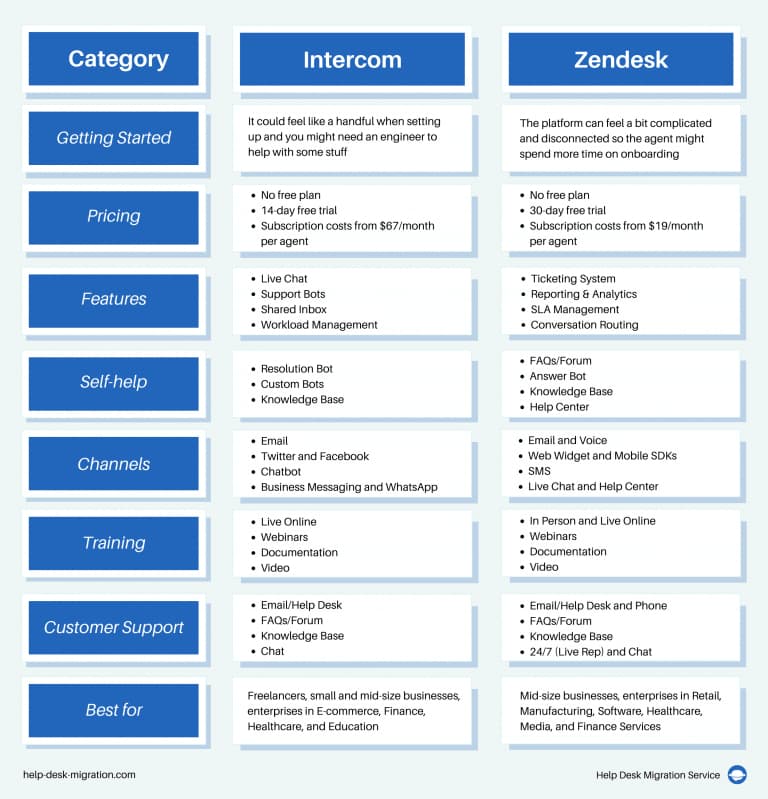
Fullview offers deep, seamless integrations with leading helpdesk and CRM platforms that form the core of modern AI customer care ecosystems.
The Zendesk integration embeds Fullview’s functionality directly within the ticket interface, providing agents with immediate access to relevant session replays and cobrowsing capabilities without context switching.
This integration automatically associates session data with specific tickets and customer profiles, creating a comprehensive view of each support interaction.
Similarly, the Intercom integration places Fullview’s tools directly within the conversation interface, allowing support teams to initiate visual assistance during live chat sessions while maintaining the conversation flow.
For Salesforce Service Cloud users, Fullview integrates with the console to combine visual context with the comprehensive customer data available in the CRM, enabling more personalized and effective support interactions.
These integrations are designed to enhance rather than replace existing workflows, providing the visual context that traditional text-based helpdesks lack.
By embedding directly into the tools support teams already use daily, Fullview reduces training requirements and accelerates adoption while delivering immediate value through faster issue resolution, improved first-contact rates, and enhanced customer satisfaction metrics.
To understand how Fullview compares to other solutions in the market, explore our comprehensive Fullview Top Alternatives and Competitors analysis featuring detailed feature comparisons and pricing information.
Is Fullview compliant with major data privacy regulations like GDPR and CCPA, and does it have SOC 2 certification?
Fullview maintains comprehensive compliance with global data privacy regulations and enterprise security standards essential for AI customer care tools handling sensitive customer information.
The platform is fully compliant with GDPR requirements through its EU-based data hosting infrastructure, robust data processing agreements, and tools that facilitate data subject access requests and right-to-be-forgotten implementations.
For CCPA compliance, Fullview provides the necessary capabilities for California consumers to exercise their privacy rights, including data access and deletion mechanisms.
The platform has achieved SOC 2 Type II certification, which represents the gold standard for security compliance in SaaS applications.
This certification, obtained through independent third-party auditing, validates Fullview’s security controls across five trust service criteria: security, availability, processing integrity, confidentiality, and privacy.
The certification demonstrates that Fullview maintains rigorous operational controls, encryption standards, access management protocols, and vulnerability management processes that meet enterprise security requirements.
For organizations in regulated industries like healthcare or finance, Fullview’s security framework provides the necessary foundation for handling sensitive customer data while enabling visual support capabilities that significantly improve service delivery and customer satisfaction outcomes.
What is the typical ROI for a support team after implementing Fullview?
The return on investment for Fullview implementation is typically realized through multiple quantifiable efficiency gains and customer experience improvements within AI customer care operations.
Support teams commonly achieve a 30-50% reduction in average handle time by eliminating the diagnostic phase of support interactions—agents can immediately see issues rather than requesting screenshots or step-by-step explanations.
First-contact resolution rates often increase by 25-40% as agents can resolve complex issues in a single session using visual context and interactive guidance.
The platform also reduces ticket escalation rates by enabling front-line support staff to handle more complex issues that would typically require senior technical resources.
Beyond direct support metrics, Fullview delivers value through reduced agent training time and improved onboarding effectiveness, as new hires can learn from recorded sessions of successful customer interactions.
The session replay functionality provides product teams with valuable user behavior insights that inform interface improvements and feature development.
Most organizations achieve full ROI within 3-6 months through combined savings in support labor costs, improved customer retention, and reduced product development cycles based on real user feedback and behavior patterns.
For step-by-step guidance on maximizing Fullview’s capabilities in your organization, visit our comprehensive Fullview Tutorials and Usecase resource featuring expert implementation strategies and best practices.
Does Fullview offer a free plan, and what are its limitations?
Fullview offers a permanent free plan designed to provide organizations with ongoing access to core functionality without time limitations.
The free plan includes 1,000 session replays per month, allowing businesses to capture and analyze user interactions while maintaining budget predictability.
This plan includes essential features such as basic cobrowsing capabilities, session recording functionality, and standard data redaction tools that ensure privacy compliance during support interactions.
The free tier is particularly valuable for small to medium-sized businesses or departments looking to evaluate the platform’s impact on their support operations before committing to paid plans.
Organizations typically use the free plan to establish baseline metrics for support efficiency, identify common user issues through session analysis, and demonstrate the value of visual context to stakeholders.
When usage requirements exceed the free tier limits or advanced features like custom data redaction rules, priority support, or extended data retention are needed, businesses can upgrade to paid plans that scale with their support volume and complexity requirements.
This freemium approach allows for gradual adoption and measurable ROI assessment before expanding implementation across the organization.
For more detailed information about Fullview’s features, implementation process, and pricing tiers, explore our complete Fullview Overview and Features guide.
How long does it take to implement Fullview and start seeing value?
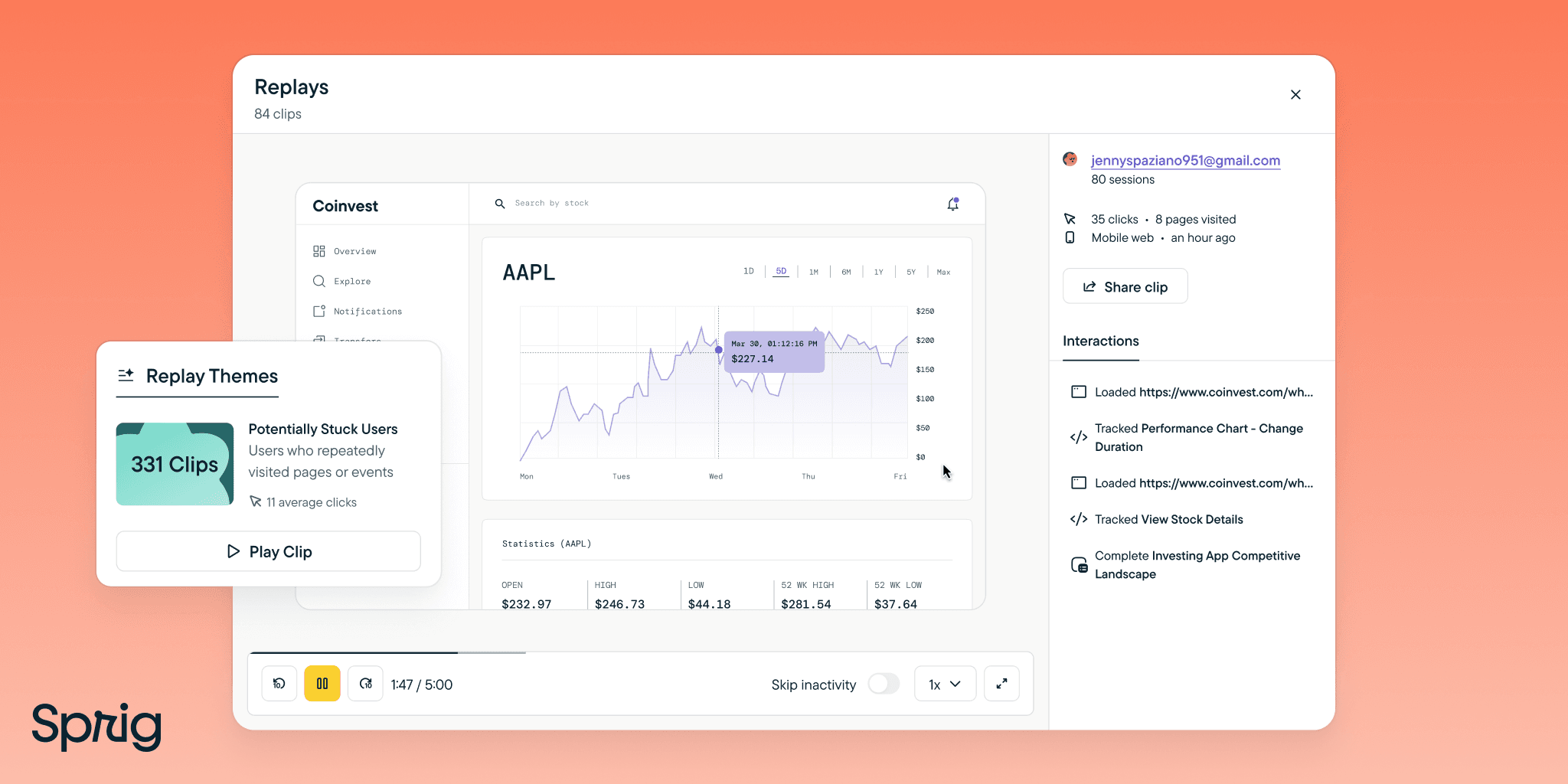
Fullview’s implementation process is designed for rapid deployment and immediate value realization within AI customer care environments.
The technical implementation typically requires less than 30 minutes, involving the placement of a lightweight JavaScript snippet in the website or application header—a process similar to installing standard analytics tools.
Once implemented, Fullview immediately begins capturing session data, meaning organizations can start gathering valuable user behavior insights from the first day of operation.
The platform’s integrations with popular helpdesk systems like Zendesk, Intercom, and Salesforce are authentication-based and can be configured in minutes, allowing support teams to access visual context directly within their existing workflows.
Most organizations begin seeing tangible value within the first week as agents use session replays to understand customer issues without additional communication and utilize cobrowsing to guide users through complex processes in real-time.
The typical implementation timeline sees organizations fully operational within 2-3 business days, with measurable improvements in support metrics appearing within the first month of use.
This rapid time-to-value makes Fullview particularly attractive for organizations looking to quickly enhance their customer support capabilities without significant implementation overhead or extended training requirements.
If you have additional questions or need further clarification about Fullview’s capabilities, visit our comprehensive Fullview FAQs page for answers to common questions and expert insights.


Leave a Reply