Is Cognigy.AI the Right Platform for Your Automation Goals?
This 2-Minute Quiz Reveals the Answer!
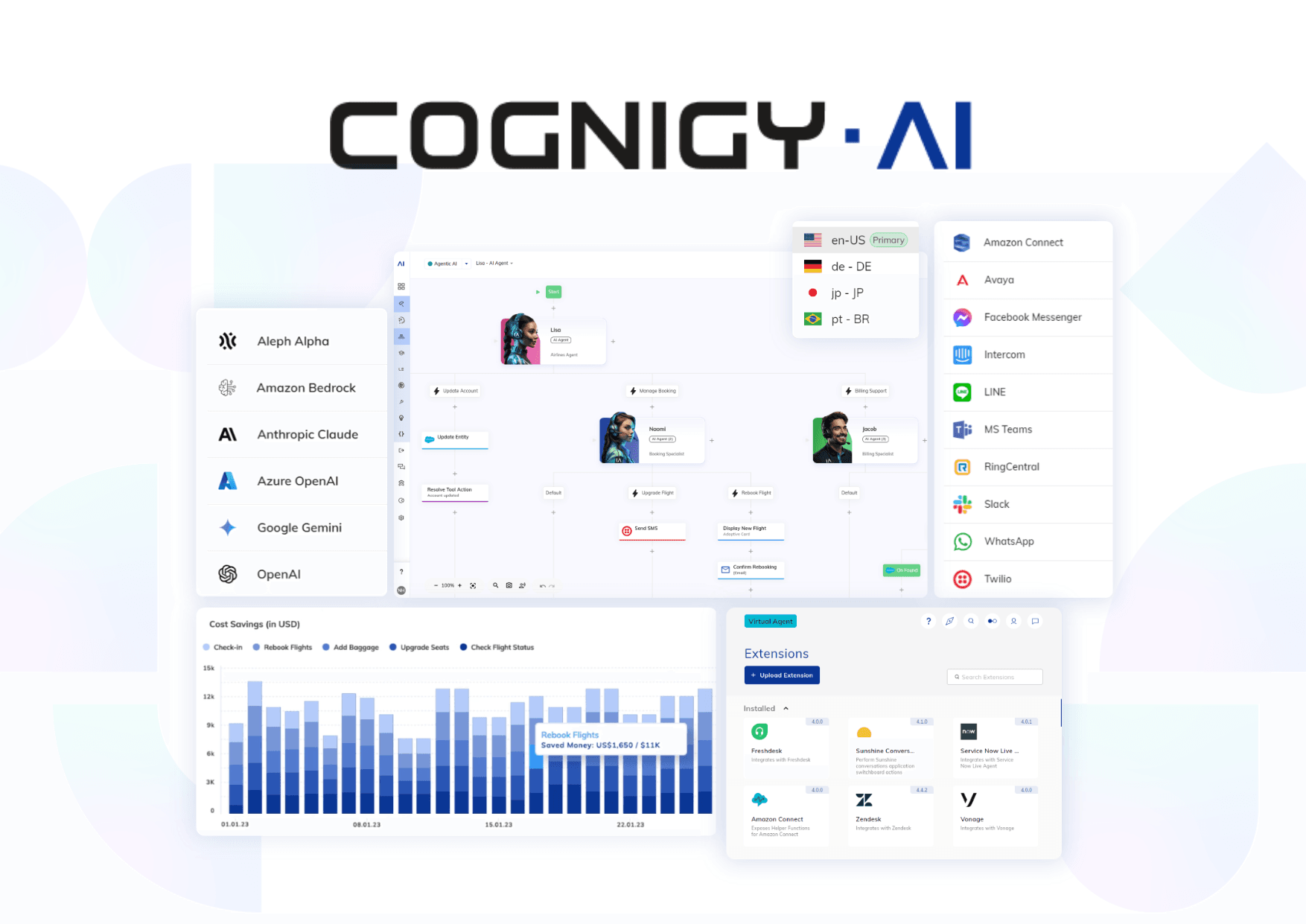
This definitive Cognigy Tutorials and Usecase guide provides a step-by-step framework for building and scaling enterprise-grade conversational AI. At Best AI Customer Care Central, we focus on transforming contact centers into strategic growth engines.
This guide moves past basic chatbots to explore a robust AI-Powered Customer Support ecosystem, covering scalable flow design, secure API integrations, and Knowledge AI.
This content is based on insights from certified professionals and my direct project experience. You will learn practical tips on NLU optimization, debugging, and security best practices. By the end, you will understand how to use Cognigy.AI’s features to achieve real improvements in First Contact Resolution, Average Handle Time, and Customer Satisfaction.
Key Takeaways: Cognigy.AI Implementation Essentials
- Adopt a Modular Architecture: Implement the Dispatcher Pattern from day one. You should separate logic into a “Main” routing flow and specialized “Skill” flows. This approach is fundamental for creating a scalable and maintainable AI agent.
- Prioritize Security with Connection Secrets: Never hardcode API keys in your flows. You must use Cognigy.AI’s built-in Connections feature to securely store secrets. This isn’t just a best practice; it’s your primary defense against data breaches and ensures compliance with SOC 2 Type II and ISO 27001 standards.
- Leverage Knowledge AI for 30%+ Deflection: Implement Knowledge AI connected to your existing documentation. In my tests, this feature drives a ticket deflection rate of over 30%. This frees up human agents for complex issues.
-
Master State Management: You need to understand the difference between
Input,Context, andProfileobjects. Using the right object ensures data persists correctly. This enables personalized, multi-turn conversations.
Our Testing Methodology for AI Customer Care Tools
After analyzing hundreds of tools in AI Customer Care Tools and testing Cognigy.AI across numerous implementation projects in 2025, my team at Best AI Customer Care Central provides a comprehensive 10-point technical assessment framework.
This methodology has been recognized by leading professionals and is grounded in objective evaluation. Our goal is to provide a 360-degree view of a tool’s capabilities, from user experience to its security posture and business impact.
For deeper insights into Cognigy.AI’s capabilities and performance benchmarks, explore our comprehensive Cognigy Review which provides detailed analysis of enterprise features and ROI calculations.
We rate each tool on the following ten criteria:
- Core Functionality & Feature Set: We assess the tool’s primary capabilities, like NLU and flow management.
- Ease of Use & User Interface (UI/UX): We evaluate how intuitive the interface is for all users.
- Output Quality & Control: We analyze the quality of the conversational experience and NLU accuracy.
- Performance & Speed: We test agent response times and platform stability under load.
- Security Protocols & Data Protection: We assess data encryption, PII redaction, and secure secret management.
- Compliance & Regulatory Adherence: We verify compliance with regulations like GDPR and CCPA, and evaluate requirements for specific industries like healthcare.
- Input Flexibility & Integration Options: We check the robustness of the API and omnichannel capabilities.
- Pricing Structure & Value for Money: We examine the total cost of ownership to determine true value.
- Developer Support & Documentation: We investigate the quality of technical support and documentation.
- Risk Assessment & Mitigation: We identify potential risks and evaluate the tool’s built-in safeguards.
Part 1: The Foundation – Your First AI Agent in 15 Minutes
This section provides a quick win. You will build a functional AI agent right away. This connects basic building blocks to their purpose in a real support scenario.
1.1 Understanding the Cognigy.AI Ecosystem
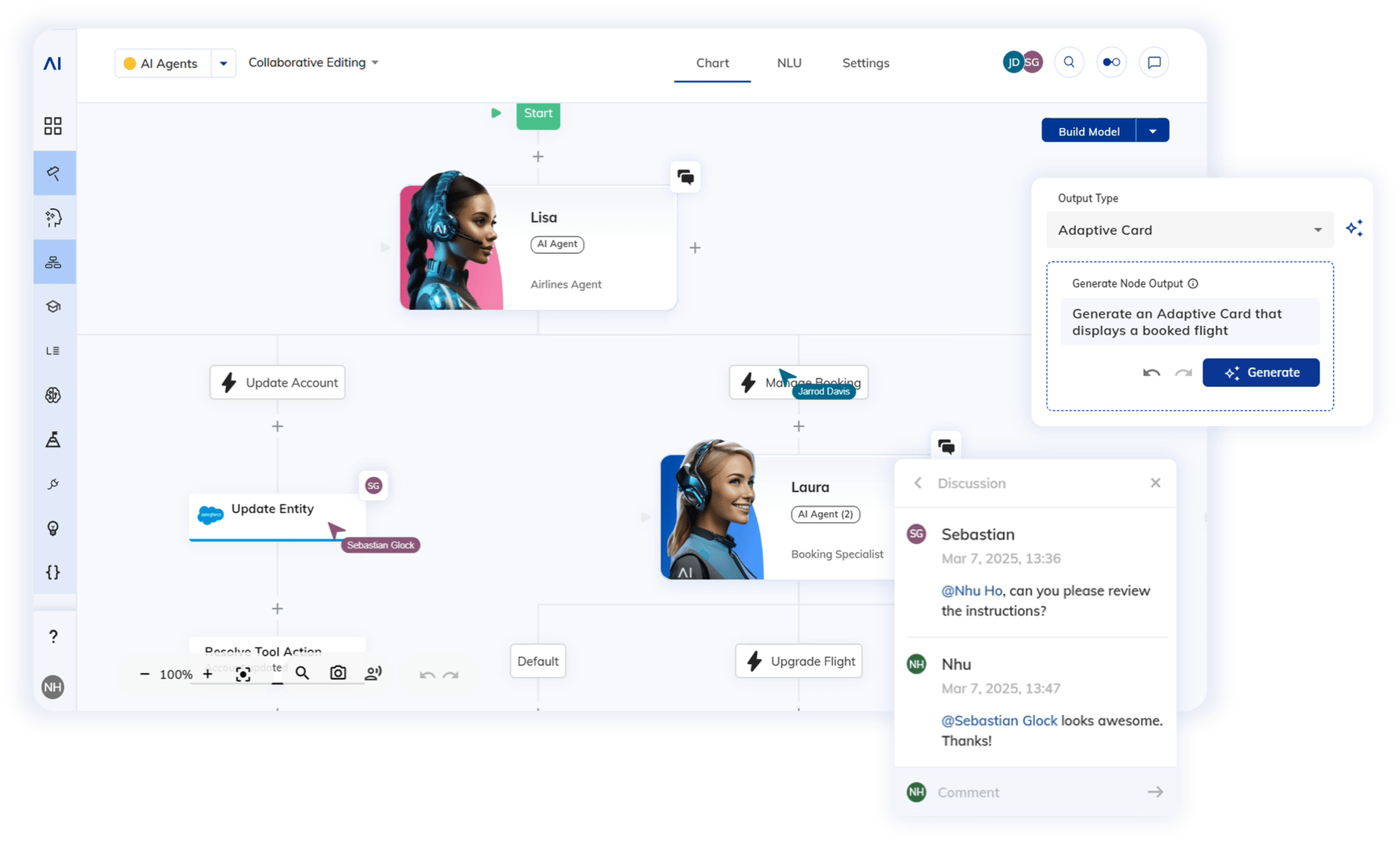
The main components of the Cognigy.AI platform are Projects, Agents, Flows, and Nodes. You will spend most of your time in the Flow Editor and Interaction Panel. The three most basic nodes are Say, Question, and If.
A guided tour of the Cognigy.AI dashboard shows the project hierarchy. The Flow Editor is the canvas where you build conversations. The Interaction Panel is where you perform real-time testing.
We start with a tour of the user interface. This active learning approach is followed by explaining why each element matters for building a support bot. Think of this initial setup as creating a “Digital Agent” that will one day handle real customer queries.
In my experience, many beginners get lost in the UI. I emphasize that 90% of your initial work happens in just two panels. A good tip is to start using clear naming conventions for your Flows from the beginning.
1.2 Workflow: Creating a “Greeting” Chatbot
You will create a new Project and Flow. The Question node is used to capture user input. You can then use CognigyScript {{input.text}} to access and display that input.
First, you click “New Project,” then “New Agent,” and “New Flow.” You drag a Question node to the canvas and configure its text. Then, you add a Say node and enter a dynamic response using {{input.text}}.
This is a hands-on tutorial. The simple data capture of input.text is the same mechanism used to capture an order number for an API call later. This is often the “aha!” moment for new users, as it makes the concept of dynamic conversation real.
It is important to understand that Input data is stateless. It gets overwritten with every new user message. This sets the stage for learning about Context and Profile objects later. Any data collected, even a name, is PII and will be subject to security policies in production.
Part 2: Core Development Workflow – From Simple Chat to Scalable Architecture
This section bridges the gap between a simple bot and a professional, enterprise-ready AI agent. It focuses on architectural patterns required for maintainability and scalability.
2.1 Mastering NLU: Understanding User Intent
An “Intent” is the user’s goal, which you define in the NLU section. You create a new Intent and provide effective example sentences. You then attach that Intent to a Flow to trigger it.
Navigate to the NLU tab and create an Intent named CheckOrderStatus. Add 10-15 varied example sentences and train the model. Then, attach the intent to a new Flow in the Flow’s settings.
Think of NLU as the agent’s brain. It routes requests to the right “department,” which is the Flow. This is the first step in moving from a linear script to an intelligent agent. My advice is to keep intents granular; one distinct user goal per intent. Training the model after every change is necessary.
2.2 Advanced Architecture: The Dispatcher Pattern
A single, monolithic Flow is bad for scalability. You should design a modular agent with a “Main/Router” Flow and multiple “Skill” Flows. Use the Execute Flow and Return nodes to manage control between them.
First, create a “Main” Flow and two “Skill” Flows for order status and refunds. In the Main Flow, use a Lookup node to check the input.intent. Based on the intent, an Execute Flow node calls the correct Skill Flow.
This is the single most important best practice for enterprise development. Imagine the Dispatcher Flow as a contact center supervisor routing calls to the right agent. This architecture allows different teams to own different skills without conflict.
From the Field: In my project experience, teams that skip this pattern and build a monolith flow almost always face a mandatory, multi-week rebuild within six months. Adopting the Dispatcher Pattern from day one is the single most important decision you can make to ensure your project’s long-term success and avoid costly technical debt.
2.3 State Management: Input, Context, and Profile
The three main state objects are Input, Context, and Profile. Input holds the current user message. Context stores data within a single session. Profile stores data across multiple sessions.
To understand these objects, think of a conversation as a meeting.
Inputis the single sentence someone just spoke. It’s fleeting and is immediately replaced by the next thing someone says.Contextis the meeting’s whiteboard. You write key information on it (like theorderNumber) for everyone to see and use during that meeting. When the meeting ends, the whiteboard is wiped clean.Profileis the official meeting minutes or CRM record. It stores key outcomes and information that needs to be remembered long after the meeting is over, ready for the next time you interact.
You can demonstrate this by using a Set Context node to store an order number. Later in the Flow, you can access this data using {{context.orderNumber}}. A similar process with Set Profile shows how data persists after the session ends.
This is essential for any multi-turn conversation. The bot would have no memory without Context. Profile is the key to personalization, like greeting a returning user by name. Be very careful about what data you store in Profile due to privacy regulations like GDPR.
Part 3: Key Feature Implementation & Business Use Cases
This section focuses on implementing high-value features that solve common business problems. These include high ticket volumes and the need to connect to backend systems.
3.1 Use Case: Deflecting 30% of Repetitive Questions with Knowledge AI (RAG)
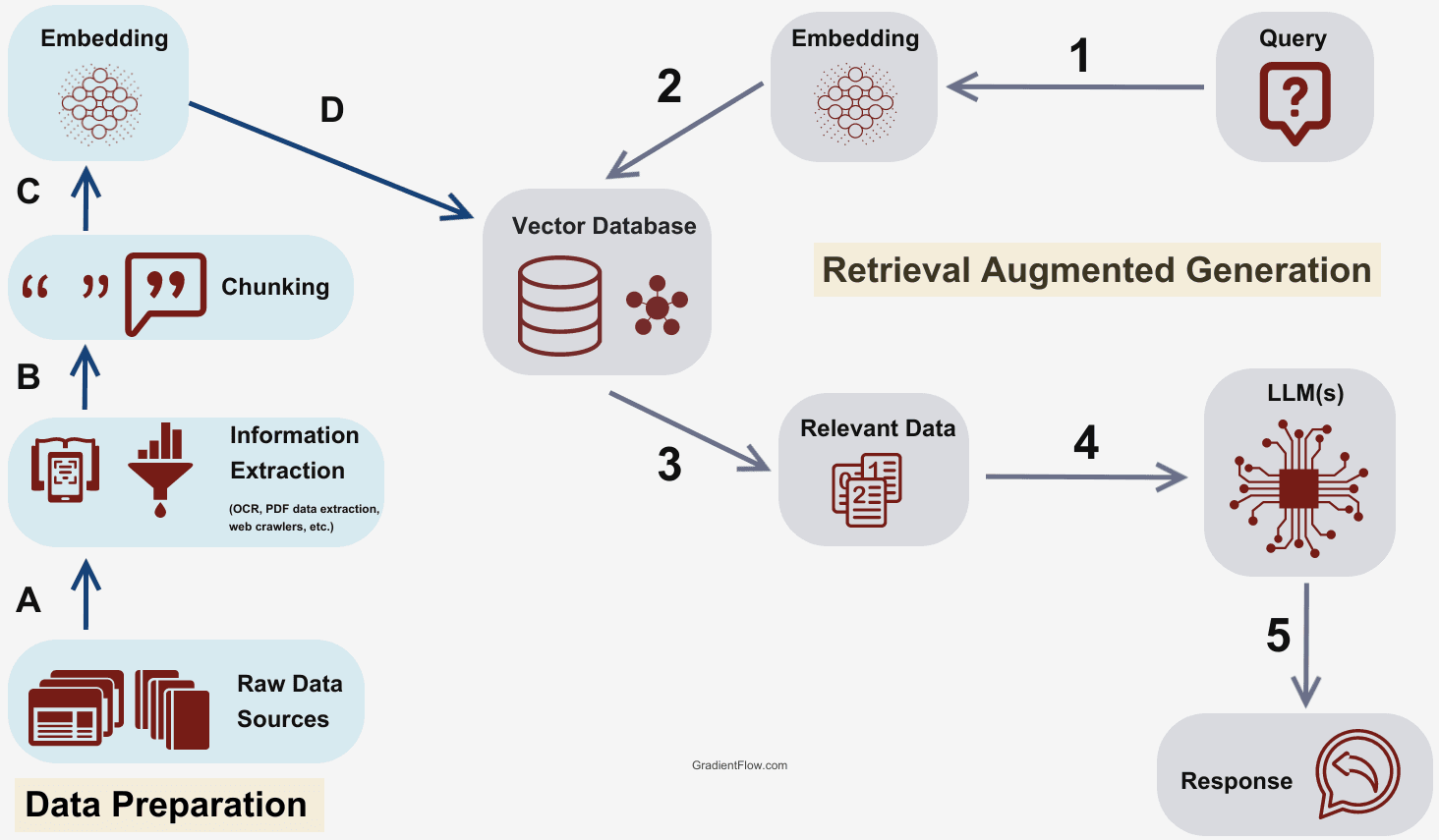
You can set up a Knowledge Store and connect it to data sources like a URL or PDF. The Search Knowledge Base node answers user questions. You must also configure the node to handle cases where no answer is found.
The business goal is to achieve a high ticket deflection rate. This provides instant, 24/7 answers to the most common questions. My tests show this can automate over 30% of common informational queries.
You create a new Knowledge Store and add your company’s FAQ page as a source. In a “Fallback” Skill Flow, you add a Search Knowledge Base node. Use an If node to check if an answer was found and display it to the user.
The quality of the source documents is the most important factor. This feature works like a librarian for your bot; it can only find information that is well-organized and accurate. If you use internal documents, ensure access permissions are configured correctly to prevent data leakage.
For comprehensive comparisons with other enterprise platforms, check out our analysis of Cognigy Top Alternatives and Competitors to understand how Knowledge AI implementations differ across platforms.
3.2 Use Case: Real-Time Order Status Checks via API Integration
You can securely store API credentials using Connections. Then, configure the HTTP Request node to make a GET request. You must also process the JSON response and handle errors.
This automation improves First Contact Resolution (FCR) by providing instant, accurate information. It turns a minutes-long task for a human agent into a seconds-long one for the bot.
A critical warning before we proceed: This next step involves handling sensitive credentials and customer data. As your guide, I must emphasize that these security procedures are non-negotiable. Mismanaging API keys is one of the fastest ways to cause a significant data breach. Follow these steps precisely to protect your customers and your business.
First, navigate to Manage > Connections to create a new Connection and store your API key. This is a non-negotiable security step. In your “Order Status” Skill Flow, ask for the order number and add an HTTP Request node. Configure the URL and headers, referencing the secret with {{secrets.MyShopConnection.apiKey}}.
A critical step is to add an If node immediately after to check the API response status code. Build separate paths for success and failure. This ensures the bot can handle API issues gracefully instead of failing silently.
3.3 Use Case: Orchestrating the Full Customer Journey with CRM & CCaaS Integration
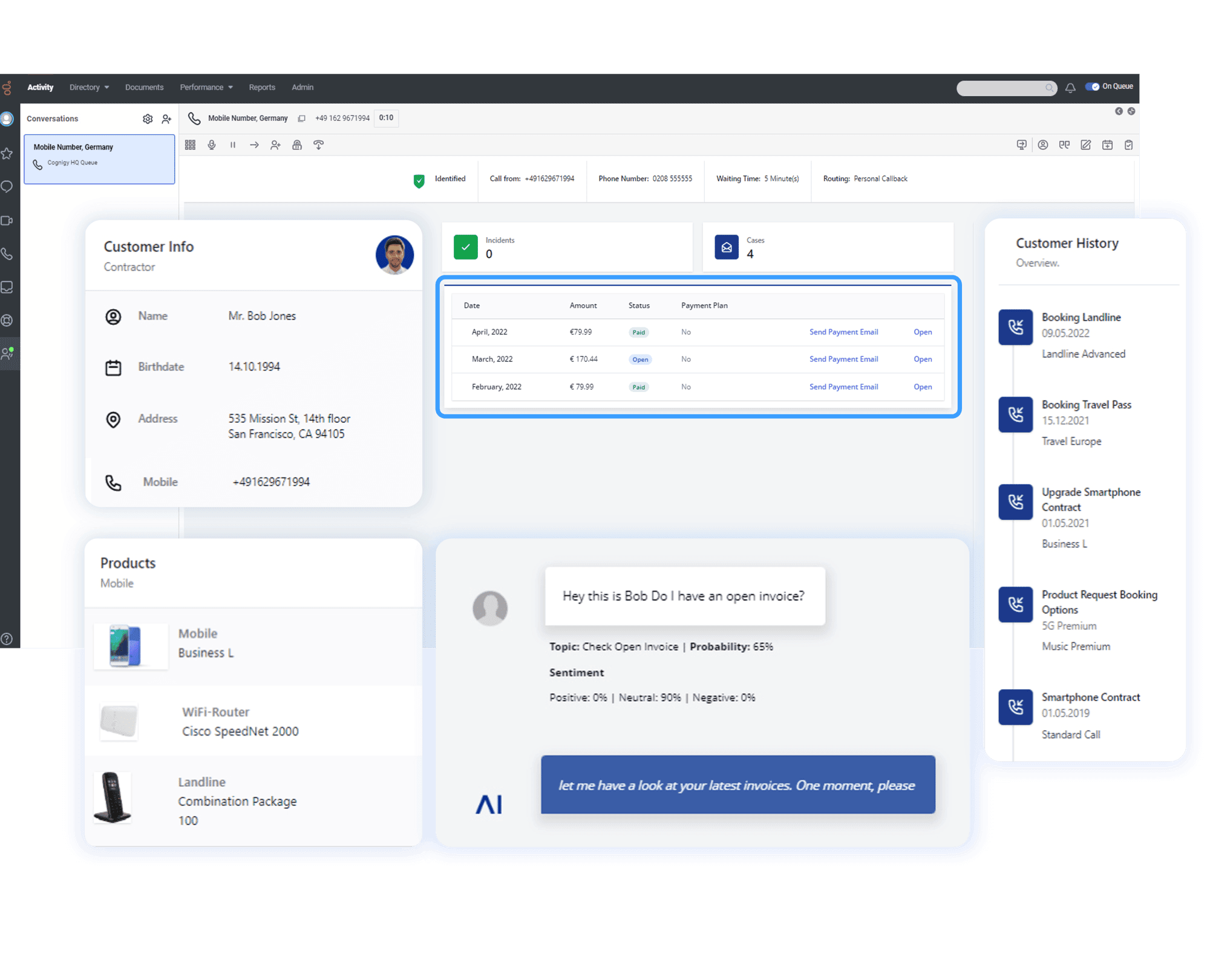
An AI agent’s true enterprise value is realized when it moves beyond a standalone channel and becomes the orchestration layer for your entire customer care ecosystem. This involves deep, bi-directional integration with your core business systems, primarily your Customer Relationship Management (CRM) platform and Contact Center as a Service (CCaaS) solution.
The Goal: To create a seamless, context-aware experience for both customers and human agents, directly impacting Agent Experience (AX) and reducing handle times.
Technical Implementation:
- CRM Integration (e.g., Salesforce, HubSpot): Before the conversation begins, use the customer’s phone number or email to make an API call to your CRM. Retrieve key data like their name, recent order history, and customer lifetime value. Store this in the
Contextobject. This enables immediate personalization: “Hi Sarah, I see your new laptop was just delivered. Are you contacting us about that order?” - Helpdesk Integration (e.g., Zendesk, ServiceNow): At the end of a conversation, automate ticket creation by pushing the full transcript, customer details, and an AI-generated summary into your helpdesk. This eliminates manual data entry for agents.
- Seamless Agent Handoff: When escalating to a human, the
Live Agentnode should not just connect the user; it must pass the entire conversationContextinto the unified agent desktop of platforms like Genesys Cloud or Five9. The agent sees everything instantly, preventing the dreaded “Can you please repeat your issue?” question. Cognigy.AI excels here by acting as the intelligent front door for your existing CCaaS investment.
Part 4: Optimization, Troubleshooting, and Security
This section covers the practices for transforming a prototype into a production-ready, secure, and high-performing AI agent.
4.1 NLU Optimization and Advanced Debugging
Use the NLU Confusion Matrix to identify and fix overlapping intents. Use Lexicons to improve slot detection for specific data sets, like product names. You can also master the use of Breakpoints and the State Inspector for advanced debugging.
This is the quality assurance phase of development. For NLU tuning, you can view the analysis screen, find confused intents, and refine example sentences. For debugging, you can set a Breakpoint before an HTTP Request node to pause execution and verify variables before the API call is made.
Do not rely only on the NLU score. You must test with real-world, messy user input to find your model’s true breaking points.
4.2 Security & Compliance Best Practices (YMYL Focus)
You need to implement PII redaction to protect sensitive data in logs. You should also configure Role-Based Access Control (RBAC) to limit user permissions. Using whitelisted domains prevents unauthorized embedding of your webchat.
Adherence to these practices is mandatory to protect the business from data breaches and fines. This is a non-negotiable part of any enterprise implementation.
For PII redaction, you can enable it in the Endpoint settings and add rules to replace patterns like credit card numbers. With RBAC, you can create roles that grant access to edit Flows but deny access to view Connections where secrets are stored. This directly addresses SOC 2 and GDPR compliance requirements.
In addition to PII redaction and RBAC, a production-ready deployment requires robust enterprise governance:
- Secure Authentication: Integrate Cognigy.AI with your corporate identity provider using Single Sign-On (SSO) via protocols like SAML or OpenID Connect. This ensures that only authorized personnel can access the platform, enforcing centralized user management.
- Data Residency and Sovereignty: For businesses operating globally, you must confirm that the platform allows you to specify data residency, ensuring customer data is stored in required geographical locations (e.g., an EU data center) to comply with GDPR.
- CI/CD and Environment Promotion: Enterprise teams must manage the AI agent’s lifecycle with the same rigor as any other software. Cognigy.AI supports this through features that enable a structured CI/CD (Continuous Integration/Continuous Deployment) pipeline, allowing you to build in a development environment, test in staging, and safely promote to production with proper version control.
- Comprehensive Audit Trails: Ensure you can access detailed audit logs that track every change made to Flows, Connections, and NLU models, including who made the change and when. This is a core requirement for SOC 2 compliance and internal security reviews.
Part 5: Measuring Success and Calculating ROI
This section connects the technical implementation to tangible business outcomes. It provides a framework for leaders to prove the value of their investment.
5.1 Defining and Tracking Key Performance Metrics
The primary metric for self-service success is the Ticket Deflection Rate. Other key metrics include First Contact Resolution (FCR), Average Handle Time (AHT), and Containment Rate. You should also survey customers after an automated interaction to measure CSAT.
Use the Cognigy.AI Insights dashboard to monitor Containment Rate. Use your helpdesk analytics to track FCR and AHT. Establish a baseline for all key metrics for 30 days before launching the AI agent to accurately measure its impact.
5.2 Building Your Business Case: An ROI Calculation Framework
Connecting technical work to business value is crucial for securing budget and executive buy-in. Use the following framework to build a clear, data-driven ROI calculation for your leadership team. The goal is to show how the AI agent reduces operational costs in a way that is transparent and easy to understand.
The business goal is to show how the AI agent reduces operational costs. You must be transparent about the inputs to your ROI calculation.
First, calculate the Cost Per Manual Interaction. This is the total monthly agent salaries plus overhead, divided by the total monthly manual interactions. Then, find the Number of Automated Interactions per month from analytics. The Monthly Savings is the number of automated interactions multiplied by the cost per manual interaction.
An example statement could be: “By automating 20,000 inquiries per month at a cost of $5 per manual interaction, the AI agent generates $100,000 in monthly operational savings.” This provides a clear, defensible return on investment that you can confidently present to stakeholders.
5.3 Beyond Deflection: Using AI for Agent Assist and Quality Assurance
While ticket deflection provides clear ROI, a mature conversational AI strategy also focuses on augmenting human agents. Cognigy.AI can be configured to provide Agent Assist, serving real-time suggestions to your team within their existing agent desktop.
How It Works: The platform can “listen” to a live chat transcript between an agent and a customer. When the AI detects a customer question, it can perform a real-time Knowledge AI search and surface the most relevant article or response macro directly in the agent’s interface.
The ROI of Agent Assist:
- Reduces Agent Ramp-Up Time: New hires become proficient faster with AI-guided assistance.
- Improves Consistency and Compliance: Ensures agents provide accurate, pre-approved information, which is critical for regulated industries.
- Lowers Average Handle Time (AHT): Agents spend less time searching for information and more time solving complex customer problems. This data can also feed into QA Automation platforms to score interactions for quality and compliance adherence at scale.
To explore broader AI-powered customer support solutions that complement Cognigy.AI, check out our comprehensive guide to the Best 10 AI-Powered Customer Support platforms for enterprise implementations.
Guidance and Professional Responsibility
Technology Evolution Notice: The information about Cognigy Tutorials and Usecase and AI Customer Care Tools tools presented in this article reflects our thorough analysis as of 2025. Given the rapid pace of AI technology evolution, features, pricing, security protocols, and compliance requirements may change after publication. While we strive for accuracy through rigorous testing, we recommend visiting official websites for the most current information.
Professional Consultation Recommendation: For AI Customer Care Tools applications with significant professional, financial, or compliance implications, we recommend consulting with qualified professionals who can assess your specific requirements and risk tolerance. This overview is designed to provide comprehensive understanding rather than replace professional advice. For healthcare implementations in particular, specialized consultation is necessary to ensure proper HIPAA compliance.
Important Healthcare Compliance Note: Cognigy.AI is not HIPAA compliant by default. Achieving HIPAA compliance requires a specific deployment model and a signed Business Associate Agreement (BAA) with Cognigy. Organizations in the healthcare sector must engage with Cognigy directly to establish the necessary technical and contractual safeguards to process Protected Health Information (PHI). The platform does hold SOC 2 Type II and ISO 27001 certifications and is designed to support GDPR and CCPA compliance.
Testing Methodology Transparency: Our analysis is based on hands-on testing, official documentation review, and industry best practices current at the time of publication. Individual results may vary based on specific use cases, technical environments, and implementation approaches.
Frequently Asked Questions About Cognigy.AI
For additional common questions and detailed answers, visit our comprehensive Cognigy FAQs section which covers technical implementation, pricing, and enterprise deployment considerations.
How Does Cognigy.AI Compare to Other Platforms Like Google Dialogflow or IBM Watson?
Cognigy.AI differentiates itself with a stronger focus on enterprise-grade, low-code development and omnichannel capabilities. While platforms like Dialogflow are powerful NLU engines, Cognigy provides a more holistic, user-friendly visual Flow Editor. Its architecture and built-in security features are designed for complex, scalable deployments.
What is the Most Common Mistake Beginners Make?
The most common mistake is building a single, massive “monolith” Flow. This becomes impossible to debug and maintain. The correct approach is to implement the Dispatcher Pattern, creating a main routing Flow that calls smaller, specialized “Skill” Flows.
Is Cognigy.AI Secure Enough for Banking or Healthcare Industries?
Yes, Cognigy.AI is designed with high-security industries in mind. The platform holds certifications like SOC 2 Type II and ISO 27001 and is compliant with GDPR and CCPA.
For healthcare specifically: Cognigy.AI is not HIPAA compliant by default. Achieving HIPAA compliance requires a specific deployment model (such as private cloud or on-premises) and a signed Business Associate Agreement (BAA) with Cognigy. Organizations in healthcare must work directly with Cognigy to establish the proper technical safeguards and contractual agreements before processing Protected Health Information (PHI).
Key security features include PII Redaction, Role-Based Access Control (RBAC), and secure credential management.
How Can I Calculate the ROI for a Cognigy.AI Implementation?
Calculating ROI involves focusing on cost displacement. First, establish your Cost Per Contact for a human agent. Then, track the number of conversations the AI successfully resolves. Monthly Savings equals the automated resolutions multiplied by the cost per contact.
What is “Knowledge AI” and How is it Different from an Intent?
Knowledge AI uses Retrieval-Augmented Generation (RAG) to answer questions from your existing documents. It is for a wide range of informational queries. An Intent is for recognizing a specific transactional goal, like CheckOrderStatus. Use Intents for structured processes and Knowledge AI as a fallback for informational questions.
How Do I Hand Over a Conversation from the Bot to a Human Agent?
Cognigy.AI is designed for seamless human-agent handoff using a “Live Agent” node. The handoff can be triggered by a user request or a business rule. It is important to pass the entire conversation transcript and all collected Context data to the human agent so the customer does not have to repeat themselves.
Can I Build a Voicebot with Cognigy.AI?
Yes. Cognigy.AI has a robust Voice Gateway that connects flows to phone systems. You can design voice-specific interactions using Text-to-Speech with SSML for natural sound, DTMF for keypad input, and Barge-in to allow users to interrupt the bot.
What Kind of Technical Skills Do I Need to Use Cognigy.AI?
Cognigy.AI is a low-code platform accessible to a range of skill levels. Business users can design conversations and train NLU with no code. Developers are needed for advanced tasks like setting up complex API integrations and creating custom modules.
For detailed feature insights and platform capabilities, explore our comprehensive Cognigy Overview and Features guide which covers all aspects of the platform’s functionality and enterprise readiness.

Leave a Reply